Businesses depend on reliable movement of goods, accurate inventory records, timely deliveries, and clear communication between teams. When these activities are managed through separate spreadsheets, phone calls, emails, and manual updates, it becomes harder to track orders and respond to problems quickly. As operations grow, these disconnected processes can create delays, duplicate work, and uncertainty about what is happening across the supply chain.
So, what is logistics software, and why do businesses use it? In simple terms, logistics software is a digital solution that helps organizations plan, coordinate, monitor, and manage the movement and storage of goods. It can support activities such as transportation planning, warehouse operations, inventory tracking, order fulfilment, and shipment visibility.
The exact capabilities depend on the type of system a business chooses. A small delivery company may need route planning and proof of delivery, while a large distributor may require connections between warehouses, suppliers, vehicles, and enterprise systems. Understanding the available options helps businesses select software that addresses real operational challenges rather than paying for features they do not need.
This guide explains logistics software in practical terms, including how it operates, the main types of systems, real-world examples, common workflows, and important considerations before implementation.
What Is Logistics Software?
Logistics software is a category of digital tools designed to help businesses organize and control the processes involved in moving goods from their origin to their destination. These processes can include receiving products, storing inventory, preparing orders, arranging transportation, monitoring shipments, and confirming delivery.
Instead of relying entirely on separate records and manual communication, a business can use software to maintain structured information about orders, products, locations, vehicles, and shipment status. Authorized employees can then use that information to complete tasks, monitor progress, and identify issues.
For example, imagine an online retailer receives an order for several products. Before the goods can be delivered, employees need to confirm that the products are available, prepare the order, assign a delivery service, share the necessary shipment information, and update the customer about progress.
Without an organized digital process, each step might depend on a separate spreadsheet or message. Logistics software can connect relevant steps, making the process easier to follow and manage.
What problems does logistics software solve?
The problems vary by company, but common examples include:
- Difficulty knowing where an order or shipment is.
- Incorrect or outdated inventory records.
- Unclear responsibilities between warehouse and transportation teams.
- Inefficient delivery scheduling and vehicle allocation.
- Repeated data entry across multiple systems.
- Delayed responses to delivery exceptions.
- Limited reporting on logistics costs and performance.
Software can help address these challenges by standardizing processes and improving access to information. It cannot automatically fix every operational issue, especially when the underlying cause is poor planning, incomplete data, or unclear responsibilities. The system must be configured around sound business processes.
How Does Logistics Software Work?
At a basic level, logistics software turns operational information into coordinated tasks and trackable updates. It records what needs to move, where it is located, which activities must happen next, and whether each activity has been completed.
The following stages describe a common workflow. The exact order may differ depending on whether a business manages freight, warehouse operations, last-mile delivery, or a combination of logistics activities.
Step 1: Capture an order or shipment request
The process begins when a customer places an order, a business requests a stock transfer, or a supplier shipment is scheduled.
The software records relevant information, such as product details, quantities, collection and delivery locations, delivery requirements, and expected dates. Some systems receive these details from an e-commerce platform or enterprise resource planning system, while others require employees to enter them.
Accurate information at this stage is essential. An incorrect address, missing product detail, or unrealistic delivery requirement can affect every later activity.
Step 2: Check inventory and availability
For orders involving stored products, the system may check available inventory before the order moves to fulfilment. It can help distinguish stock that is available from stock already reserved for other orders or recorded as unavailable.
If an item is not available, the business may need to replenish it, transfer stock from another location, or inform the customer about an alternative arrangement.
The software supports this decision by presenting the relevant records, but inventory accuracy still depends on proper receiving, picking, returns, and stock-adjustment procedures.
Step 3: Plan fulfilment and transportation
Once an order is ready to progress, the system can support decisions about where it should be fulfilled, how it should be prepared, and how it should be transported.
Depending on the platform, planning may involve grouping deliveries, checking vehicle capacity, assigning drivers, selecting carriers, and arranging collection or dispatch times.
More advanced tools may recommend routes or schedules based on configured requirements and available data. Employees may still need to adjust plans for traffic conditions, access restrictions, special handling, or customer availability.
Step 4: Prepare and dispatch the goods
Warehouse employees receive the information needed to pick, pack, label, and prepare an order. The system can record completed tasks and update the order’s status when the shipment is ready.
At dispatch, relevant shipment information may be shared with drivers, carriers, or receiving teams. The level of automation depends on the system and its integrations.
A consistent handover is important because the warehouse and transportation teams need to work from compatible information about what is being shipped and where it needs to go.
Step 5: Track shipment progress
After dispatch, the system can record updates such as collection, transit, arrival at a facility, an attempted delivery, or successful delivery.
Updates may come from a driver application, a carrier integration, a barcode scan, a connected device, or a manual status change. Businesses should understand where their tracking data comes from and how frequently it is refreshed.
Shipment visibility helps employees answer customer questions and identify exceptions. If an expected update does not arrive, the team can investigate instead of assuming that the delivery is progressing normally.
Step 6: Confirm delivery and review performance
At the end of the process, the business records delivery confirmation or the reason an order could not be completed. Depending on the workflow, this may include a timestamp, recipient confirmation, or proof-of-delivery record.
The accumulated information can then support reporting on delivery performance, order accuracy, processing times, costs, and recurring issues.
This final stage is important because logistics software should help businesses learn from completed operations, not merely record transactions. Reviewing results can reveal where planning, communication, or resource allocation needs improvement.
Understanding the Logistics Software Workflow
A logistics software workflow describes the sequence of tasks, decisions, and updates through which a shipment or order moves. It defines what happens first, who is responsible for each activity, what information is required, and what should happen when a problem occurs.
A typical order workflow might begin with order creation, followed by an inventory check, warehouse preparation, transportation assignment, dispatch, shipment tracking, and delivery confirmation. If a product is unavailable, an address is incorrect, or a delivery attempt fails, the workflow should also define the next action.
For example, consider a distributor receiving an order from a retail customer. The order enters the system and is checked against stock records. Warehouse staff prepare the goods, and the dispatch team assigns an appropriate vehicle or carrier. Once the goods leave the facility, the shipment status is updated. If delivery is completed, the record is closed; if the recipient is unavailable, the order is flagged for follow-up.
A clear workflow makes it easier to see which stage is responsible for a delay. Instead of asking several employees for updates, a supervisor can review the recorded status and direct attention to the task that remains incomplete.
Why workflow design matters
Not every process should be automated immediately. Businesses first need to understand how work currently moves between departments and where unnecessary steps occur.
A useful workflow should have clear task ownership, sensible approval rules, accurate information, and defined exception handling. If a process is confusing before digitization, putting it into software without redesigning it may simply make the confusion harder to correct.
Types of Logistics Management Systems
There is no single logistics platform that works identically for every company. Different types of systems focus on different parts of the supply chain, and some products combine several capabilities in one application.
Understanding the types of logistics management systems helps businesses determine which category best matches their requirements.
Transportation Management System (TMS)
A transportation management system supports the planning and execution of goods movement. Its capabilities may include route planning, carrier selection, freight coordination, shipment scheduling, transportation cost tracking, and delivery monitoring.
A TMS can be useful for businesses that coordinate frequent shipments or work with multiple carriers. It helps transportation teams organize delivery activities and review performance across routes and service providers.
For instance, a distributor delivering products to several retail locations may use a TMS to plan shipments, assign carriers, and monitor delivery progress.
Warehouse Management System (WMS)
A warehouse management system focuses on activities inside a warehouse or distribution centre. Depending on its capabilities, it may support goods receiving, storage locations, picking, packing, stock movement, cycle counting, and dispatch preparation.
A WMS helps warehouse teams organize tasks and maintain more consistent records of where products are stored and how they move through the facility.
A business with complex warehouse operations may need this specialized functionality even if it already uses a separate system for transportation.
Inventory Management Software
Inventory management software helps businesses record and monitor stock quantities, movements, reservations, replenishment, and transfers. It can be used independently or as part of a wider logistics platform.
The primary goal is to help employees understand what stock is available and where it is located. More advanced solutions may provide alerts for low stock or support demand-based replenishment rules.
Inventory tools are especially useful when businesses need to coordinate products across multiple storage locations or maintain accurate stock records while orders are being processed.
Fleet Management Software
Fleet management tools help organizations manage vehicles and related operational information. Depending on the platform, features may include vehicle allocation, maintenance schedules, driver records, fuel reporting, location monitoring, and vehicle utilization.
A company operating its own delivery fleet may use these tools to organize vehicle availability and maintenance. Businesses that outsource transportation may need fewer fleet-specific features and may prioritize carrier coordination instead.
Order Management Software
Order management software coordinates order-related information from creation through fulfilment. It may connect customer orders with inventory, payment or accounting systems, warehouse tasks, and delivery services.
Although order management and logistics software can overlap, their main emphasis may differ. An order management system focuses on managing the order lifecycle, while logistics-focused systems may place greater emphasis on physical movement, storage, and delivery.
Integrated logistics platforms
Some platforms combine transportation, warehouse, inventory, order, and tracking capabilities. This can reduce the need for separate tools, although integration and data-sharing requirements still need careful assessment.
An integrated platform may be useful for organizations that want a broader view of their supply chain. However, a business should compare the platform’s actual capabilities with its needs rather than assuming that a larger system is automatically better.
How Logistics Technology Works Behind the Scenes
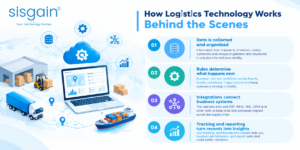
Understanding how logistics technology works involves looking at the information, integrations, and rules that connect the different stages of a shipment.
A logistics platform is not simply a digital checklist. Depending on the solution, it may include a database, user interface, workflow engine, reporting tools, and connections to other applications or devices.
Data is collected and organized
The system receives information about orders, products, inventory, locations, vehicles, and delivery requirements. This information may come from employees, barcode scanners, mobile applications, external carrier systems, or connected business software.
The platform organizes the information so that authorized users can access the records they need. Consistent data formats and clear ownership help reduce confusion when multiple teams work on the same order.
Rules determine what happens next
A workflow engine can apply configured rules to decide which task should follow another. For example, an order may be released for warehouse preparation only after the required checks are complete.
Some rules are straightforward, while others depend on business conditions. A shipment requiring special handling may follow a different process from a standard delivery. The system must reflect those differences accurately.
Integrations connect business systems
Logistics operations often depend on information stored outside the logistics platform. An e-commerce system may create orders, an inventory application may maintain stock records, and a carrier service may provide shipment updates.
Integrations allow relevant information to move between these systems, reducing the need for repeated manual entry. Before implementation, businesses should establish which system is responsible for each important record and how conflicting or missing data will be handled.
Tracking and reporting turn records into insights
As tasks are completed, the platform records status changes and operational events. Reporting features can summarize this information and help managers identify delays, recurring exceptions, or changes in workload.
For reliable results, the system needs accurate inputs, sensible rules, and a clear process for dealing with missing updates. Technology can make information easier to use, but it cannot guarantee that every recorded event is correct.
Practical Logistics Software Examples
The best way to understand logistics software is to see how different businesses may use it. These are illustrative examples of common workflows, not claims about specific companies or measured customer results.
Example 1: An e-commerce business managing customer orders
An online store receives orders throughout the day. Its logistics system checks available stock, sends fulfilment information to the warehouse, and records when an order is packed and dispatched.
Once the shipment is handed to a carrier, tracking updates help the service team respond to customer questions. If an order is delayed, employees can review the available status information and determine whether follow-up is needed.
This type of setup can help reduce manual coordination between sales, warehouse, and delivery teams.
Example 2: A distributor delivering to multiple locations
A distributor needs to deliver products to retail stores, offices, or other business customers. Its transportation team must consider delivery windows, shipment quantities, vehicle capacity, and driver availability.
Transportation software can help organize delivery assignments and provide a record of planned versus completed deliveries. Managers can then investigate recurring delays or inefficient vehicle use.
The benefit comes from better planning and visibility rather than from assuming that software will automatically select a perfect route every time.
Example 3: A warehouse managing stock movement
A warehouse receives goods from suppliers and dispatches products against customer orders. Employees need to know where stock is stored, which items are reserved, and what needs to be picked next.
A warehouse or inventory system can record receiving, storage, picking, and dispatch activities. If the physical stock differs from the digital record, the business can investigate the discrepancy and correct the process that caused it.
Example 4: A freight business coordinating shipments
A freight company may handle shipments from multiple customers, coordinate collection and delivery, and work with external transport partners.
Its logistics platform may organize shipment records, capture milestone updates, maintain documentation, and provide visibility across active consignments. This can help employees identify shipments that have not received an expected update and contact the responsible party.
These examples show why software selection should begin with the business workflow. A company focused on last-mile delivery may need different capabilities from one managing warehouse inventory or international freight.
How Logistics Software Improves Efficiency
The practical value of logistics software becomes clearer when businesses examine the time and effort involved in completing everyday tasks. The phrase how logistics software improves efficiency is closely connected to three areas: reducing unnecessary manual work, improving access to information, and helping employees identify problems earlier.
Less time spent searching for updates
When records are spread across emails, spreadsheets, and messaging tools, employees may need to contact several people to confirm an order’s status. Shared records can make relevant information easier to find and reduce repeated follow-ups.
Better coordination between departments
Warehouse, dispatch, customer service, and management teams can work from compatible information instead of maintaining separate versions of the same record. This can improve handovers and make responsibility for the next action clearer.
Faster identification of exceptions
A dashboard or notification may highlight an order that has not progressed as expected. Employees can investigate the cause and take appropriate action before the issue creates additional work.
More consistent processes
Standardized workflows help employees follow the same basic steps for receiving orders, preparing shipments, recording delivery attempts, and resolving exceptions. This is particularly useful when operations involve multiple teams or locations.
Businesses should measure these improvements rather than assume they have occurred. Comparing processing time, error frequency, and exception resolution before and after implementation can reveal whether the system is delivering meaningful operational value.
Logistics Workflow Automation Tools and Their Role
Automation allows software to complete defined actions when specified conditions are met. In logistics, this may involve sending notifications, assigning tasks, updating records, validating information, or flagging exceptions for review.
Suitable logistics workflow automation tools can reduce repetitive administrative work while helping employees follow consistent processes.
Automated notifications
The system can notify relevant employees when an order is ready for dispatch, a shipment requires attention, or a delivery update is missing. Notifications should reach the right people and provide enough context for them to act.
Too many unnecessary alerts can have the opposite effect, causing employees to ignore important messages. Businesses should configure notifications around meaningful events and priorities.
Rule-based task assignments
A workflow can assign a task to a team or responsible person based on defined criteria. For example, an exception may be routed to customer service, while a stock discrepancy may require warehouse review.
The assignment rules should reflect actual responsibilities and include a clear process for situations where the normal owner is unavailable.
Data validation and status updates
Software can check whether required fields have been completed or whether a status change follows an expected sequence. These checks can reduce incomplete records and make operational information more consistent.
Automation should not be used blindly. If a task requires human judgment, customer communication, or special approval, the workflow should allow the appropriate employee to review the situation.
Exception handling
A reliable workflow explains what should happen when a normal process cannot be completed. Failed deliveries, unavailable inventory, missing shipment details, and delayed collections may each require a different response.
By defining these paths in advance, businesses can reduce uncertainty and make it easier to track unresolved issues.
Logistics Operational Efficiency: How to Measure Results
Logistics Operational Efficiency is not measured by the number of features a software platform provides. It is reflected in how effectively a business moves and stores goods while meeting its service requirements and managing resources responsibly.
A company should choose a small set of indicators that match its main operational challenges.
On-time delivery rate
This measures the proportion of deliveries completed within the agreed time window. Businesses should define what counts as on time and use consistent records when comparing results.
Order accuracy
Order accuracy reflects whether the correct products and quantities are prepared and delivered. Tracking errors can help identify issues in inventory records, picking procedures, packaging, or order entry.
Cost per shipment
This indicator helps a business understand the average cost associated with moving a shipment. Comparisons should use a consistent cost definition and account for changes in shipment size, distance, service level, and operating conditions.
Order processing time
Measuring the time between order receipt and dispatch can reveal delays in stock confirmation, picking, packing, documentation, or scheduling.
Exception resolution time
Businesses can measure how long it takes to resolve problems such as failed delivery attempts, missing information, or stock discrepancies. Shorter resolution times may indicate better coordination, provided the issues are handled correctly rather than closed prematurely.
Inventory accuracy
This compares recorded stock information with actual inventory. Reliable records help businesses make better fulfilment and replenishment decisions.
Reviewing these measures over time helps managers distinguish real improvement from assumptions. Software should support operational decisions, not replace the judgment required to interpret the results.
What Should Businesses Consider Before Choosing Logistics Software?
Selecting a platform is easier when the business understands its current process, its main problems, and the outcomes it expects to achieve. The most expensive or feature-rich option is not necessarily the most suitable.
Define operational requirements
Start by documenting the activities that need support. A company may need better stock visibility, improved transportation planning, more reliable shipment tracking, or stronger coordination between warehouses and delivery teams.
Prioritize requirements according to their business impact. This helps avoid paying for capabilities that do not solve a meaningful problem.
Review integration needs
Check whether the proposed system can exchange information with the applications the business already uses. Important considerations may include inventory records, accounting software, customer orders, carrier updates, and enterprise resource planning systems.
Confirm which integrations are available, whether additional development is required, and how the systems will handle missing or inconsistent information.
Assess usability and training
A system can be technically capable but difficult for employees to use. The interface should make common tasks clear, and training should reflect each team’s responsibilities.
Before a full rollout, allow the people who will use the platform to test representative workflows. Their feedback can reveal practical issues that might not be obvious during a product demonstration.
Understand security and access controls
Logistics records may contain customer details, shipment information, supplier records, and business-sensitive data. Businesses should assess user permissions, authentication, audit records, data handling, backup arrangements, and the provider’s security practices.
The appropriate controls depend on the type of information processed and the organization’s requirements.
Compare total cost, not only the subscription
The overall investment may include licensing, setup, integrations, customization, data migration, training, maintenance, and ongoing support. Businesses should understand these costs before committing to a solution.
They should also establish how success will be measured, who will oversee implementation, and how issues will be managed after launch.
When Does a Business Need Custom Logistics Software?
Ready-made software can be a good fit when a business follows common logistics processes and can adapt its operations to the platform. Custom development becomes worth evaluating when important requirements cannot be handled effectively through available products or standard configuration.
Potential reasons include specialized order rules, complex integration requirements, unique delivery models, or the need to coordinate several systems through a tailored workflow.
A custom solution can be designed around the business’s specific needs, but it also requires careful planning. Development, testing, integration, security, documentation, and ongoing maintenance all affect the overall cost and timeline.
Before committing to a custom build, businesses should compare three options: adapting existing processes to ready-made software, configuring an existing platform, or developing a tailored application. The best choice depends on operational complexity, available budget, future plans, and the importance of the requirements that cannot otherwise be met.
When to evaluate a development partner
Businesses considering logistics software development services in dubai should assess a provider’s understanding of their workflows, technical capabilities, integration approach, testing process, and post-launch support.
Useful questions include:
- How will the provider document the current and proposed workflows?
- Which integrations are included, and which require additional work?
- How will the solution handle exceptions and changing operational needs?
- What testing, training, documentation, and maintenance are included?
- How will project progress and success be measured?
A clear scope and realistic implementation plan help reduce misunderstandings. Businesses should evaluate proposals based on their requirements and the provider’s ability to deliver a maintainable solution, rather than relying on broad promises about automation or cost savings.
Common Misconceptions About Logistics Software
Some businesses delay adoption because they misunderstand what the technology does, while others expect it to solve problems that require process changes as well.
Misconception 1: Logistics software is only for large companies. Smaller businesses can also benefit from order tracking, stock visibility, and structured delivery workflows. The solution simply needs to match the scale and complexity of their operations.
Misconception 2: Automation removes the need for employees. Automation generally handles defined tasks and routine updates. People remain important for exception handling, customer communication, planning, and decisions that require context.
Misconception 3: Software guarantees lower costs. A platform can help identify waste and support better resource allocation, but savings depend on how the system is implemented and used. Poor configuration or inaccurate data can limit its value.
Misconception 4: Every logistics activity should use one system. An integrated platform may simplify coordination, but some businesses will continue to need specialized systems. What matters is whether the tools share reliable information and support the overall workflow.
Misconception 5: Implementation ends when the system goes live. Employees may need additional training, workflows may require adjustment, and integrations need ongoing monitoring. Regular reviews help keep the system aligned with changing business requirements.
Recognizing these limitations makes it easier to set realistic expectations and focus on improvements that can be demonstrated through operational results.
How SISGAIN Technologies Approaches Business Technology Needs
SISGAIN Technologies helps businesses evaluate technology initiatives in relation to their operational requirements and long-term objectives. A sound starting point is to understand existing processes, identify recurring challenges, and establish measurable goals before selecting or building a solution. Integration, usability, security, scalability, and ongoing maintenance should all be considered during planning. This practical approach helps decision-makers assess technology options more carefully and focus on systems that support their business processes rather than introducing unnecessary complexity.

Conclusion
Logistics software helps businesses organize the movement and storage of goods by connecting orders, inventory, warehouse activities, transportation, tracking, and reporting. Understanding how logistics software works makes it easier to identify which capabilities can address a company’s specific operational challenges.
The right system can improve visibility, standardize routine processes, support better planning, and help teams respond to exceptions more effectively. However, results depend on reliable data, appropriate integrations, employee adoption, and clear workflows.
Businesses should begin by identifying their most important logistics problems, comparing suitable software options, and establishing measurable performance goals. With a realistic implementation plan and regular performance reviews, logistics software can become a useful part of a more organized and scalable operation.
Frequently Asked Questions
1. What is logistics software in simple words?
Logistics software is a digital tool that helps businesses manage how goods are stored, transported, tracked, and delivered. It can coordinate activities such as inventory checks, order preparation, vehicle assignment, shipment updates, and delivery confirmation.
2. What are the most common types of logistics software?
Common types include transportation management systems, warehouse management systems, inventory management software, fleet management tools, order management systems, and integrated logistics platforms. Each focuses on different activities, so businesses should select the type that fits their requirements.
3. How does logistics software work step by step?
A typical process begins when an order or shipment is recorded. The system checks relevant information, supports inventory and transportation planning, coordinates preparation and dispatch, records tracking updates, and captures delivery confirmation. Reporting tools can then help managers review performance and identify recurring problems.
4. Can logistics software be used by small businesses?
Yes. Small businesses can use it to organize orders, maintain inventory records, plan deliveries, and reduce manual administration. They should select a solution that fits their current workload, budget, and expected growth.
5. What is the difference between logistics software and warehouse management software?
Logistics software can cover several parts of moving goods, including transportation, tracking, inventory coordination, and delivery. Warehouse management software focuses primarily on activities inside a warehouse, such as receiving, storage, picking, packing, and dispatch preparation. A broader logistics platform may include warehouse capabilities or integrate with a separate WMS.
6. How can a business know whether logistics software is working effectively?
A business can compare performance before and after implementation using indicators such as delivery reliability, order accuracy, inventory discrepancies, processing time, cost per shipment, and time taken to resolve exceptions. Results should be reviewed consistently and against the goals established before implementation.