Ask a developer what an app will cost and you will usually hear it depends. That answer is accurate and unhelpful. The better question is which features you want, because features, more than anything else, decide the final invoice.
This guide walks through the main drivers behind the cost to build a React Native app one feature at a time. You will see what each adds to the budget, which ones are worth including in a first release, and how to avoid paying for complexity you do not need yet.
Start With the Big Picture
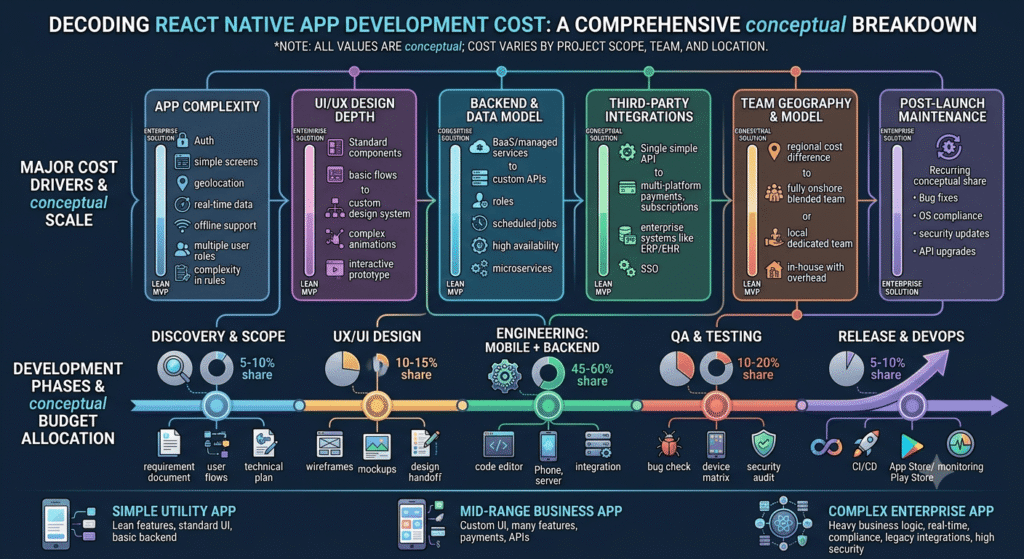
A React Native app can cost anywhere from about $5,000 for a lean MVP to more than $200,000 for an enterprise platform. Most production apps land between $20,000 and $80,000, depending on features, design, and where the team is based.
The shared codebase is the reason React Native stays affordable. One team builds for both iOS and Android, which commonly cuts staffing needs by 30 to 40 percent compared with two native apps. Feature choices then determine where in the range you land.
Screens and Business Logic
Every screen needs design, development, and testing. A six-screen app and a twenty-five-screen app are different projects, even if they look alike on a pitch deck. Define your screen count before requesting quotes.
Business logic is the hidden multiplier. An app with simple lists and forms costs far less than one with conditional workflows, multi-step approvals, and complex rules. Complexity is usually the largest single driver of cost.
Design and User Experience
Template-based interfaces are quick and affordable, but they feel generic. Custom design systems, branded animations, and polished micro-interactions cost more and often earn it back through better retention.
Good design also prevents rework. Testing a prototype with real users before engineers write production code is far cheaper than changing finished software.
Backend and APIs
Most apps need a server, a database, and a set of APIs, and this work often takes 30 to 40 percent of the total budget. It powers sign-in, data storage, notifications, and everything that happens off the screen.
Teams that skip backend planning get surprised later. Ask vendors to price backend work as its own line so you can see where the money goes.
Third-Party Integrations
Connecting to Google Maps, Stripe, Twilio, Firebase, or social login providers is routine, but each integration adds time. A typical integration can add $500 to $3,000 depending on complexity.
Payment flows deserve extra attention. Stripe, PayPal, Razorpay, or in-app purchases each need careful implementation, edge-case testing, and compliance checks, and a single payment flow can add two to three weeks to the timeline.
Real-Time, Offline, and Admin Features
- Real-time features such as chat, live tracking, and dashboards add technical complexity through WebSockets or push services.
- Offline mode needs local data syncing and conflict resolution, and typically adds $3,000 to $8,000.
- A basic web admin panel adds about $3,000 to $10,000, while a feature-rich one can reach $15,000 to $25,000.
- Scalability architecture, such as load balancing and caching, adds cost when you expect heavy traffic from day one.
AI Features
Chatbots, recommendation engines, and image recognition are increasingly common, and they come with a real price tag. Budget roughly $5,000 to $25,000 or more for AI integration, depending on depth.
Start with one narrow AI feature tied to a measurable outcome. Adding several at launch raises cost, delays release, and makes it hard to learn what actually worked.
Security and Compliance
Apps that handle payments or health data need encryption, secure API design, and compliance work. Security-focused development typically adds 15 to 25 percent to the budget, and it is not a place to economize.
For US projects, ask vendors about experience with HIPAA, PCI DSS, and state privacy laws. Request evidence, not promises.
A Simple Way to Price Your Own App
- List every screen and the feature behind it.
- Mark each feature as essential, helpful, or nice to have.
- Ask vendors to estimate essential features first.
- Price integrations, admin tools, and AI as separate line items.
- Add a buffer of 10 to 15 percent for change, plus 20 to 30 percent for first-year running costs.
This exercise takes an afternoon and produces a far better brief than a one-paragraph idea. Vendors respond with sharper estimates, and you can compare them line by line.
Where to Save and Where Not To
Save on nice-to-have features, custom animations, and early scale. Use open-source libraries instead of building common components from scratch, which can save 20 to 30 percent in development time. Launch an MVP first, which can cut initial spending by 40 to 60 percent.
Do not save on testing, security, or clear requirements. Those cuts return later as bugs, breaches, and rework.
Common Feature Creep Traps
Feature creep usually arrives politely. A stakeholder wants one more filter, one more notification type, one more report. Each request looks small, yet together they can add weeks and thousands of dollars.
Protect the budget with a simple rule: nothing enters version one unless something of equal size leaves, or the budget changes in writing. Keep a visible list of postponed ideas so that good suggestions are not lost, only scheduled.
How Features Affect the Timeline
Time and money move together. A lean MVP often takes six to ten weeks. A mid-complexity app commonly takes four to seven months, and enterprise products can run seven to twelve months. Payment flows, real-time features, and offline sync are among the usual reasons a schedule stretches.
Ask vendors to show the timeline per feature group, not just a single end date. It makes trade-offs visible when someone asks whether a feature can fit before launch.
Questions to Ask Vendors About Each Feature
- How many days does this feature take, and what is assumed?
- Does the estimate include testing and edge cases?
- Which parts depend on third-party services, and what do those cost monthly?
- What could make this feature larger than estimated?
- Can a simpler version ship first and grow later?
Review the Estimate With Your Team
Before accepting a quote, walk through it with the people who will use the product. Sales, support, and operations often spot missing features or unrealistic assumptions that a founder alone would miss. An hour of review at this stage can prevent a month of rework.
Set a Review Rhythm
Revisit the feature list and the budget at the end of every sprint or every month. Small adjustments are easy when you see them early, and they become painful when they pile up unnoticed. Share the updated picture with your development partner so that both sides stay aligned.
Getting a Feature-Level Estimate
SpaceToTech is a software and mobile app development company based in Noida, India, working with clients in the US, UK, UAE, Australia, and India. If you want a feature-by-feature estimate for your app, you can share your list with SpaceToTech’s React Native development team and compare the result against the ranges above.
A budget built feature by feature is easier to defend, easier to adjust, and far less likely to surprise you.