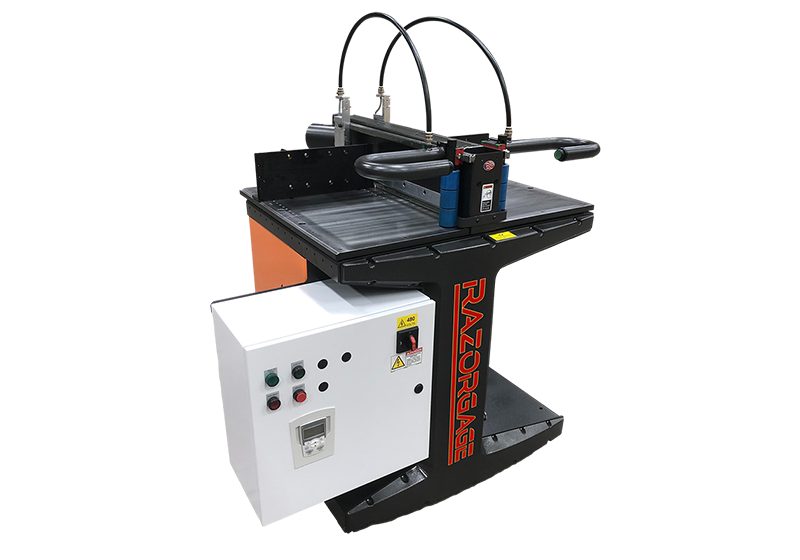
Ask any cabinet or millwork shop owner where money leaks out, and the cutoff station comes up fast. A tape measure, a pencil, a tired operator at 3 pm, and a few good boards ending up in the scrap bin. The RazorGage upcut saw is built to fix exactly that. It pairs a rigid, programmable positioning system with an upcut saw, so the machine handles the measuring and the operator handles the loading. In this post I’ll go through how it works, what it’s made of, and who gets the most out of it.
Who Is Behind RazorGage?
RazorGage has been building saw stops and pusher systems since 2001. The product line is made by Technical Services, Incorporated in Ames, Iowa. The company is known for machine-tool grade accuracy and for answering the phone when a customer has a problem. That second part matters more than people think, because a saw that sits idle waiting for support costs real money.
The range starts with the XT-PC positioner, which comes with a rugged Android tablet. At the top sits the RazorOptimal, an optimizing cutoff saw system. Most shops begin somewhere in the middle and grow into the bigger machine.
How Does the RazorGage Upcut Saw Work?
The saw itself is the Cyclone upcut saw. The material is clamped automatically from the top, left and right, and the blade rises up through the stock to make the cut. A 500mm blade is standard, and a 600mm blade is optional. With the larger blade, the saw can cut up to 1 inch thick by 20 inches wide. The blade is direct drive and slides on Hiwin linear bearings, which keeps things stiff and steady.
The Positioning System Underneath
A saw is only as good as its stop. The carriage runs on a linear rail with a double bearing block, the same kind of setup you’d expect on a CNC machine. A planetary gear reduction keeps backlash close to zero. In plain words, the stop lands on the same spot every time, whether it’s the first cut of the morning or the thousandth.
What Is the RazorOptimal, and Why Should You Care?
The RazorOptimal takes the RazorGage ST measuring system and combines it with the Cyclone 600 upcut saw. The clever part is defect handling. The operator marks knots, splits or bad spots with a crayon. The machine scans the board length and those marks, then rearranges the remaining parts so they fit into the clean areas. If you’d rather not use crayon, there’s also a joystick option for entering defects by hand.
After that, the saw advances the stock, makes the cuts, and can print part information straight onto the material. So the person on the saw doesn’t have to guess what each piece is for. For shops that cut a lot of lineal stock, that’s less thinking per board and fewer wrong pieces going downstream.
Software That Doesn’t Need a Computer Degree
The system runs on a Windows tower PC with a large touch screen. You can store thousands of cutlists and sort them into groups using different criteria. It accepts .csv cutlist files from common design software, so you aren’t retyping numbers by hand. Cut parts are tracked too, so if something gets damaged, you can add it back to the list.
Because it’s Windows-based, sharing files over your network works like it does on any other office computer. RazorGage controllers also have built-in Wi-Fi. For a small shop without an IT person, that’s one less headache.
Options: Pocket Holes, Scribe Marks and Labels
Here’s where the system can grow with you. If you build face frames, you can get the RazorOptimal with an 18-inch down-cut saw instead of the upcut. That version drills pocket holes and scribes face frame layout marks automatically. Other add-ons include inkjet printing, spaceball insertion and a sorting assist feature called RazArray.
I’d be honest about the trade-off here. The pocket hole version swaps the upcut saw for the down-cut one, so you pick based on the work you do most. Plain cutoff and crosscut jobs lean toward the upcut. Face frame work leans the other way.
Is It the Right Fit for Your Shop?
It makes the most sense where you cut a lot of repeat parts, deal with natural wood defects, or lose time to measuring errors. A shop cutting a handful of boards a week probably doesn’t need it. A shop running cutlists all day probably does.
A few practical things to check first. The Cyclone saw needs three-phase power, either 230 VAC at 30A or 460 VAC at 20A. Pricing isn’t posted publicly, so you’ll need to request a quote. My advice is to ask for a demo and bring your own cutlist and a few defect-heavy boards. Watching the machine handle your real material tells you more than any spec sheet.
Final Thoughts
If your cutting station depends on a tape, a pencil and good luck, a programmable system pays for itself in saved material and saved time. The RazorOptimal is the fuller version of that idea, with defect scanning, optimizing software and part labeling built in. Talk to the RazorGage team, describe your daily cutting, and see which setup matches it.
FAQs
1. What is the RazorGage upcut saw?
It’s the Cyclone upcut saw that RazorGage pairs with its programmable measuring system. The blade rises through clamped material, and the stop positions each cut automatically from your cutlist.
2. How is the RazorOptimal different from a basic saw stop?
A basic saw stop only positions the material. The RazorOptimal also scans for crayon-marked defects, optimizes your parts around them, and can print part information on the stock.
3. What blade sizes are available?
A 500mm blade comes standard, and a 600mm blade is optional. The larger blade can cut up to 1 inch thick by 20 inches wide.
4. What power does it need?
The Cyclone saw runs on three-phase power, either 230 VAC at 30A or 460 VAC at 20A. The pocket hole saw version needs more, so confirm with RazorGage before you plan the install.
5. Can it import cutlists from my design software?
Yes. It works with .csv cutlist files from common design software, and you can store thousands of lists and sort them into groups.
Contact Us:
Address: 57006 241st Street Ames, IA 50010
Phone: 515.232.3188