Introduction
Think about the last time you stood in a long billing queue at a retail shop. Chances are, the slowdown wasn’t because the shop was busy — it was because billing was slow. The cashier was typing product names manually, hunting for prices on a printed list, or calculating totals by hand. Every second of that wait is a friction point, and friction costs shops real customers.
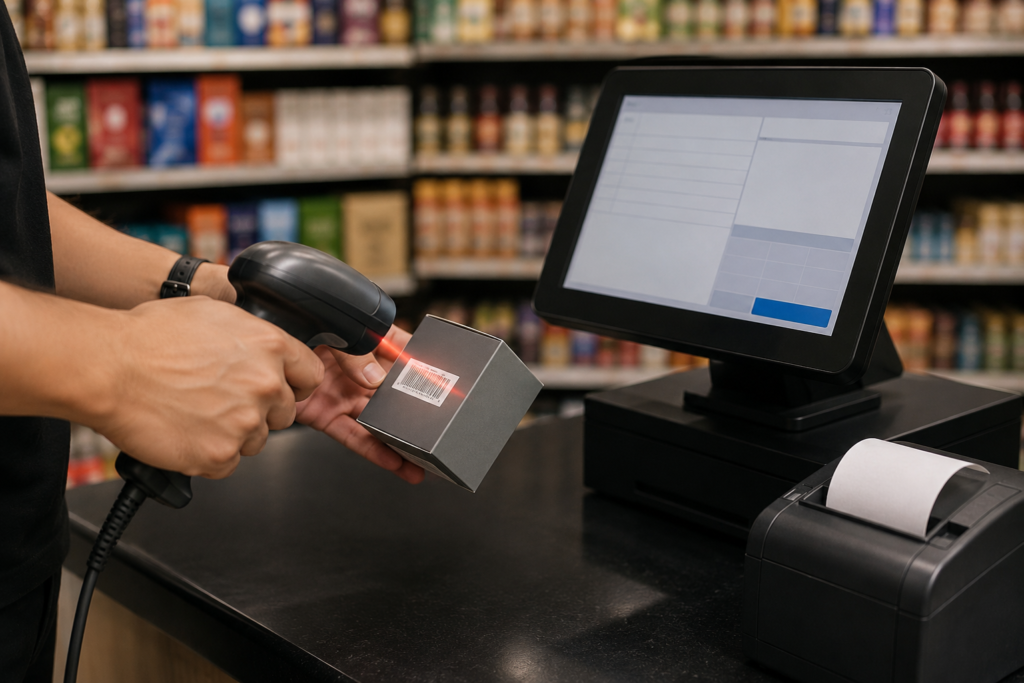
Now picture the opposite: a cashier picks up an item, passes it under a scanner, and the product name, price, tax rate, and stock count update instantly. The entire bill is ready in seconds. That’s what billing software with barcode scanning delivers, and it’s no longer a feature reserved for large supermarkets or corporate chains.
For retail shops of every size and category — from a neighborhood grocery to a busy medical store to a fine jewellery showroom — barcode-integrated billing has become one of the most practical and high-return upgrades available. This article explains exactly how it works, why it matters, and what to look for when choosing a system that fits your shop.
What Is Billing Software with Barcode Scanning?
Billing software with barcode scanning is a retail billing system that connects to a barcode scanner (handheld, countertop, or built-in) and uses the product’s barcode — whether a standard EAN/UPC code, an MRP barcode, or a custom barcode printed by the retailer — to instantly retrieve all product details from the software’s database.
When a cashier scans an item:
- The product name and description populate automatically
- The correct selling price and applicable GST rate are applied
- The quantity is added to the bill
- The stock count in inventory updates in real time
- The total, including taxes, is calculated without manual input
The entire transaction happens in one smooth motion. No typing, no price lookup, no manual tax calculation.
How Barcode Billing Works in a Retail Setup
Step 1: Product Master Setup
Before barcode billing can work, every product in your inventory must be registered in the software with its barcode number (either from the manufacturer’s label or a custom code you assign), along with its price, GST rate, HSN code, and stock quantity.
Step 2: Barcode Label Printing (Where Applicable)
For products without manufacturer barcodes, or for items like loose goods, custom products, or bulk stock, most billing software includes a barcode label printing feature. You print your own barcodes and attach them to products, bringing them into the scanning system.
Step 3: Scanning at the Counter
At the billing counter, the cashier uses a barcode scanner — connected via USB or Bluetooth — to scan each item. The software instantly pulls up the product and adds it to the bill.
Step 4: Bill Generation and Inventory Update
Once all items are scanned, the software generates a complete, GST-compliant invoice and simultaneously deducts the sold quantities from your live stock count. No separate inventory entry is needed.
Why Barcode Scanning Matters: The Core Benefits
1. Dramatically Faster Checkout
Speed is perhaps the most immediate and visible benefit. Manual billing, even with a simple POS system, requires the cashier to search for products, type or select them individually, and verify prices. Barcode scanning replaces all of that with a single action.
In a busy retail environment — a grocery shop at peak hours, a medical store with a queue, a garment shop during a sale — the difference in checkout speed is significant. Faster billing means shorter queues, better customer experience, and the ability to handle higher transaction volumes without adding staff.
2. Near-Elimination of Billing Errors
Manual billing is vulnerable to human error at multiple points: wrong product selected, incorrect price typed, wrong quantity entered. Each error either costs the retailer money or creates a dispute with the customer.
Barcode scanning removes manual input from the equation. The product, price, and tax rate are pulled directly from a verified database entry. The only way an error occurs is if the product master was set up incorrectly — a one-time issue that’s easy to audit and fix, unlike recurring manual mistakes.
3. Real-Time Inventory Accuracy
Every scanned sale is an automatic inventory deduction. This keeps your stock count accurate at all times, without any separate stock entry process. You know exactly what’s on your shelves at any moment, which means smarter purchasing decisions, timely reorder alerts, and no more selling products that have already run out.
4. Better GST Compliance
When product details are stored in a verified master with correct HSN codes and GST rates, every invoice generated through barcode scanning is automatically GST-compliant. The risk of applying the wrong tax rate, using an incorrect HSN code, or missing a tax line on an invoice is virtually eliminated.
This is especially important for multi-category retail shops where different products attract different GST slabs. Barcode billing applies the right rate for each item without any manual decision.
5. Reduced Training Time for New Staff
Training a new cashier to bill manually requires teaching product knowledge, pricing, discount rules, and tax application — a process that takes days and still results in errors during the learning period.
With barcode billing, the learning curve shrinks dramatically. A new staff member needs to learn one core skill: scan the item and confirm the quantity. Everything else is handled by the software.
Barcode Billing Across Different Retail Categories
Different retail types use barcode billing in slightly different ways, and the best billing software solutions are built to accommodate these variations.
Grocery and Supermarket Retail
High transaction volumes and a diverse product mix make barcode scanning essential for grocery operations. A dedicated grocery billing software that supports barcode scanning allows cashiers to process dozens of items per customer quickly and accurately, with automatic weight-based billing integration for items sold by the kilogram.
Pharmacy and Medical Stores
Pharmaceutical retail involves unique complexity: batch numbers, expiry dates, drug schedules, and varied GST rates across product categories. When barcode billing is integrated into pharma billing software, scanning a medicine automatically retrieves not just its price but its batch number, expiry date, and applicable tax, ensuring both billing accuracy and regulatory compliance with every transaction.
Jewellery Retail
Jewellery billing looks different from other retail categories because items are often unique, priced dynamically based on daily gold rates, and may include making charges, wastage, and hallmarking details. A well-designed jewellery shop software uses barcodes not for mass-scanning but for precise product identification, ensuring that each piece is billed with its exact specifications and current pricing — reducing the scope for errors on high-value transactions where even a small mistake carries significant financial consequence.
Garment and Apparel
Garment retailers manage a wide range of product variants by size, color, and style. Barcode scanning linked to variant-level inventory ensures that billing a medium blue shirt in size 38 correctly deducts exactly that variant from stock, not a generic “shirt” entry.
Electronics and Appliances
Barcode scanning in electronics retail captures serial numbers and IMEI codes, which are essential for warranty tracking and after-sales service. Without barcode integration, this information must be manually entered with every sale, a slow and error-prone process.
Barcode Scanner Compatibility: What to Check
Not all billing software works equally well with all barcode scanners. Before investing in a barcode billing setup, verify the following:
| Factor | What to Check |
| Scanner compatibility | Does the software support USB and Bluetooth scanners? |
| Barcode format support | Does it read EAN-13, EAN-8, Code 128, QR codes, and MRP barcodes? |
| Label printing | Can the software generate and print custom barcodes for your products? |
| Offline scanning | Does scanning still work during internet outages (for cloud-based software)? |
| Speed of product fetch | Is the product retrieved instantly after scan, or is there a lag? |
| Multi-unit support | Can one barcode apply to different selling units (e.g., piece vs. box)? |
| Serial/IMEI capture | For electronics, can the scanner capture serial numbers during billing? |
Barcode Billing and Business Compliance
Beyond operational efficiency, barcode billing carries meaningful compliance benefits that are particularly relevant in India’s regulatory environment.
When every product in your system is assigned a correct HSN code and GST rate before billing begins, every invoice your shop generates is consistent, accurate, and audit-ready. This is directly relevant to:
- GST return filing: Correct invoices mean your GSTR-1 data matches your actual sales, reducing the risk of mismatches and notices.
- E-invoicing readiness: As e-invoicing thresholds continue to lower, having a barcode-integrated billing system that stores complete product data makes e-invoice generation seamless.
- Business registration and formalization: Retailers formalizing their businesses — registering as a private limited company, applying for MSME certification, or seeking trade credit — benefit significantly from being able to produce organized, digitally maintained sales records. Clean billing history generated through barcode scanning provides exactly this.
Globally, accurate digital transaction records are a prerequisite for formal business operations. Whether you’re operating in India, Southeast Asia, or any other market, barcode-based billing creates the reliable paper trail that banks, auditors, and tax authorities expect.
Choosing the Right Billing Software with Barcode Scanning
When evaluating options, go beyond basic scanner compatibility and look at the complete picture:
- Does the software offer a built-in product master with barcode fields? You should be able to store barcodes, HSN codes, tax rates, and pricing in one place.
- Can it print barcode labels? For products without manufacturer barcodes, in-software label printing is essential.
- Does it update inventory automatically with each scan? This is non-negotiable for accurate stock management.
- Is it category-specific or generic? Industry-specific solutions handle the nuances of your retail type more reliably than generic tools.
- What hardware does it support? Check that your preferred scanner model is compatible before purchasing.
- Is it GST-compliant by default? Barcode data should flow directly into correctly formatted, compliant invoices.
Conclusion
Barcode scanning isn’t a premium feature for large retailers anymore. It’s a practical, affordable upgrade that delivers measurable improvements in billing speed, accuracy, compliance, and stock control for shops of any size.
The shift from manual billing to barcode-integrated billing is one of the highest-return changes a retailer can make. It removes human error from the checkout process, keeps inventory accurate without extra effort, and generates clean, compliant records that support both daily operations and long-term business growth.
If your shop is still billing manually or using a POS system without barcode integration, the question isn’t really whether barcode billing is worth it. The question is how much time, money, and accuracy you’re losing every day without it.
Frequently Asked Questions
1. Can small shops with limited stock use barcode billing software, or is it only for large retailers?
Barcode billing is equally valuable for small shops. Even with a modest product range, barcode scanning reduces billing time, eliminates pricing errors, and keeps inventory accurate automatically — benefits that are just as meaningful for a 500-SKU shop as for a 5,000-SKU supermarket.
2. Do I need to buy a separate barcode scanner, or is it included with billing software?
Billing software and barcode scanners are typically sold separately, though some vendors offer bundled packages. Most billing software supports standard USB or Bluetooth barcode scanners available from hardware vendors. Check your software’s compatibility list before purchasing a scanner.
3. What if some of my products don’t have a printed barcode on the packaging?
Most billing software includes a barcode label printing feature. You can generate custom barcodes for any product in your inventory and print labels to attach to items that don’t have manufacturer barcodes.
4. Will barcode billing software work if my internet connection goes down?
This depends on whether you’re using cloud-based or desktop billing software. Desktop and offline-first billing systems continue working during internet outages because data is stored locally. Cloud-based systems may require an offline mode feature — check for this specifically if internet reliability is a concern in your location.
5. How long does it take to set up barcode billing software for a retail shop?
Setup time depends on the size of your product catalog. For shops with a few hundred products, entering product details and barcodes into the software typically takes one to two days. For larger inventories, phased entry or bulk import via a spreadsheet, which most software supports, can speed up the process significantly.
6. Does barcode billing software help with GST compliance in India?
Yes, significantly. When each product is configured with the correct HSN code and GST rate in the software, every barcode-scanned invoice is automatically GST-compliant. This removes the risk of applying incorrect tax rates manually and ensures your sales data matches your GST return filings accurately.